

Hytale Hardware Requirements, What You Actually Need!
The Hytale team has released the first official PC system requirements for Early Access. This post summarizes them in a practical way for players and creators, with a focus on what really matters for performance.
The key idea: Hytale behaves more like a heavy sandbox/voxel simulation than a typical lightweight game. Once your GPU meets the minimum, your CPU and RAM become the main performance drivers, especially in singleplayer.
Three Performance Tiers
Hytale defines three main tiers:
* Minimum: ~30+ FPS at 1080p, Low preset
* Recommended: ~60+ FPS at 1080p, High preset
* Recording / Streamer: Stable 60+ FPS at 1440p while recording or streaming
All tiers require a 64-bit operating system and a 64-bit CPU.
Minimum Requirements (1080p @ 30 FPS)
Target: Playable 1080p on low settings.
OS:
* Windows 10 64-bit (version 1809 or later)
* Windows 11
CPU (or equivalent):
* Intel Core i5-7500
* AMD Ryzen 3 1200
RAM:
* Singleplayer with dedicated GPU: 8 GB
* Singleplayer with integrated GPU: 12 GB
* Multiplayer-only: 8 GB
GPU:
* Integrated: Intel UHD Graphics 620, AMD Radeon Vega 6
* Dedicated: NVIDIA GTX 900 series, AMD Radeon 400 series, Intel Arc A-series
Note: Your GPU must support at least OpenGL 4.1. Future versions may additionally require Vulkan 1.3 and DirectX 12.
Storage:
* SATA SSD with around 20 GB free space recommended
Network (multiplayer):
* Minimum 2 Mbit/s download (UDP/QUIC capable)
At this level, you should keep view distance around 192 blocks and close unnecessary applications to maintain stable performance.
Recommended Requirements (1080p @ 60 FPS)
Target: Smooth 1080p gameplay on high settings.
OS:
* Windows 10 64-bit (version 1809 or later)
* Windows 11
CPU (or equivalent):
* Intel Core i5-10400
* AMD Ryzen 5 3600
RAM:
* 16 GB
GPU:
* Integrated: Intel Iris Xe Graphics, AMD Radeon 660M
* Dedicated: NVIDIA GTX 900 series, AMD Radeon 400 series, Intel Arc A-series
Storage:
* NVMe SSD with 20 GB free space
Network (multiplayer):
* Recommended 8 Mbit/s download
On this tier, 60+ FPS at 1080p High with a decent view distance is realistic, as long as you are not pushing huge modpacks or extreme settings.
Creator / Streamer Setup (1440p @ 60 FPS)
Target: Stable 60 FPS at 1440p while recording or streaming with high visual quality.
OS:
* Windows 10 64-bit (version 1809 or later)
* Windows 11
CPU (or equivalent):
* Intel Core i7-10700K
* AMD Ryzen 7 3800X
RAM:
* 32 GB
GPU:
* NVIDIA RTX 30 series
* AMD Radeon RX 7000 series
* Intel Arc A-series
Storage:
* NVMe SSD with at least 50 GB free (and ideally at least 10% of the drive free overall)
* Recommended: separate drive for video recording
Modern GPUs with strong hardware encoders (AV1 / HEVC) provide much better image quality at the same bitrate, which is especially important for streaming platforms.
Storage & World Size
Hytale worlds are procedurally generated and can grow without a hard cap. Some reference values:
* Installation size: ~8 GB
* Example save (Exploration mode):
* ~661 MB for a 5000×5000 block world
* ~27 KB per 32×32 chunk
The team recommends at least 10 GB of available space, with 20 GB being a safer long-term target. An SSD is strongly recommended, NVMe preferred.
Network Requirements & View Distance
Hytale is a digital-only download; there are no physical copies. Once installed, you can play singleplayer in offline mode.
For multiplayer, bandwidth usage scales mostly with view distance. The team tested a worst-case Exploration server scenario by constantly moving at 1.5x speed to stress world loading.
View distance 192 blocks:
* Minimum: 2 Mbit/s
* Recommended: 4 Mbit/s
View distance 384 blocks:
* Minimum: 4.5 Mbit/s
* Recommended: 7 Mbit/s
View distance 480 blocks:
* Minimum: 6 Mbit/s
* Recommended: 10 Mbit/s
Normal play (mining, building, moderate exploration) uses significantly less bandwidth. Small minigame maps such as SkyWars or BedWars require very little data and can be playable even on ~1 Mbit/s connections.
Singleplayer vs Multiplayer Load
How you play changes how your hardware is used:
Singleplayer:
* Client and server both run on your machine
* Local world generation, NPC simulation, voxel logic, networking layer
* Much higher CPU and RAM load compared to multiplayer
Multiplayer:
* Server runs on a remote machine
* Your PC mainly handles rendering, input, and client logic
* Typically better performance on the same hardware
If your PC struggles with singleplayer, you may still get very smooth performance on multiplayer servers.
Why CPU and RAM Matter So Much
As a voxel sandbox, Hytale:
* Uses heavy CPU resources for world generation, NPC AI, and simulation
* Needs enough RAM to store loaded world areas and data
* Uses VRAM for large texture atlases and geometry, especially at high view distances
Once you meet the minimum GPU spec, putting your budget into a better CPU and more RAM often helps more than jumping to a very high-end graphics card. Extremely high view distances can still push GPUs into VRAM limits and cause stuttering.
Mods, View Distance, and Performance
* Large mods, complex server-side logic, and big content packs increase CPU, RAM, and VRAM usage significantly.
* Doubling view distance (for example from 192 to 384) roughly quadruples the volume of loaded world.
* The team considers 384 blocks a “sweet spot” for the world design; 192 blocks is a practical compromise for weaker systems.
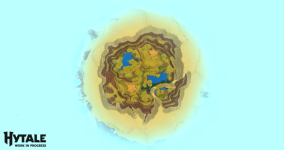
(Screenshot of 192 view distance from above)
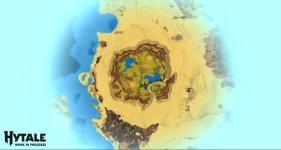
(Screenshot of 384 view distance from above)
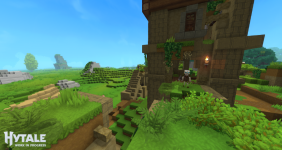
(Screenshot of 192 view distance from player perspective)
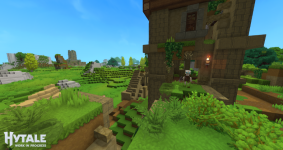
(Screenshot of 384 view distance from player perspective for recommended gameplay)
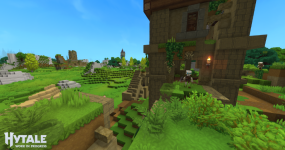
(Screenshot of 768 view distance from player perspective)
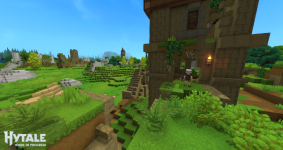
(Screenshot of 1024 view distance from player perspective)
Platforms & Ongoing Optimization
* The requirements currently focus on Windows PCs.
* Mac and Linux requirements are still being finalized for both Intel and Apple Silicon Macs, and will be published later.
* Steam Deck support is not finalized; on paper it should run, but input mapping, UI scaling, and platform policies still need to be resolved.
* Optimization is ongoing and performance is expected to improve through Early Access and beyond.
The system requirements will be updated as optimizations land and more data is collected.
Practical Takeaways
* Integrated graphics with 8–12 GB RAM can run Hytale at 1080p with low settings and reduced view distance.
* A modern mid-range CPU, 16 GB RAM, and a decent GPU should give a very solid 1080p High experience.
* Creators targeting 1440p streaming or recording should prioritize a strong multi-core CPU, 32 GB RAM, and a modern GPU with AV1/HEVC encoding support.
In short: meet the GPU minimum, then focus on CPU, RAM, SSD speed, and a sensible view distance. This combination will matter far more for how Hytale feels moment to moment than chasing the absolute highest-end graphics card.